

Recently, we introduced our PowerSync SDK for Tauri. The SDK is a Tauri plugin, meaning that it consists of two parts:
- A Rust crate used to access a local SQLite database, sync changes via PowerSync, and notify JavaScript apps about changes.
- A small JavaScript library acting as a type-safe wrapper around the raw Tauri IPC commands supported by our Rust crate.
As part of the development work, we also looked at ways to test our new SDK. Tauri basically offers three modes of testing:
- A
MockRuntimefor Rust, allowing us to write unit tests for our Rust crate by mocking out JavaScript. - A fake Tauri environment for JavaScript, allowing us to write unit tests for our JavaScript package by mocking out Rust.
- A WebDriver integration, allowing us to test everything together.
Especially when writing Tauri plugins, options 1 and 2 provide very little value. How our JavaScript and Rust sources interact is the most interesting thing we want to test, as our SDK wouldn't work if anything about that was wrong. Two tests each mocking the other half provide no guarantees.
So the only option left available to us was to spin up a demo app and use WebDriver support built into Tauri for integration tests. However, that option has its own big issues:
- It's designed to test Tauri apps, while we're interested in testing plugin functionality.
- It doesn't work on macOS, which is what most of us use.
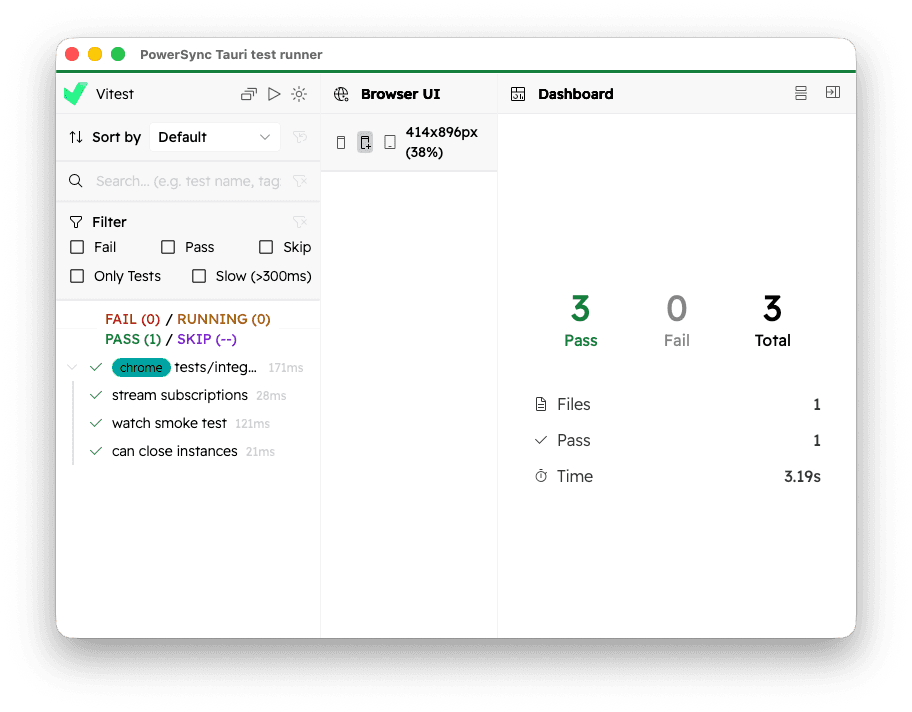
In the end, we found a neat way to very reliably test everything in our Tauri plugin nonetheless: Instead of driving an app through WebDriver, what if we launched a Tauri app that simply... tested itself? After all, this is exactly how we test most of our JavaScript nowadays: Instead of mocking web or React APIs to run tests in Node, we let vitest spawn a browser and use the real thing. That loads a web page running our tests, reporting results back to a local vitest server which will print them and set an appropriate exit code for CI.
Using Tauri as a vitest browser
Starting from version 4, vitest has pretty decent support for custom browsers. So our plan to test our SDK was fairly straightforward:
- Write a tiny Tauri app that allows loading any URL and loads the PowerSync Tauri plugin.
- Tell vitest to launch that app with a custom URL instead of spawning a browser.
You can see the whole thing in action here.
The main.rs for our test app is very simple: It receives a URL as a CLI argument before opening a window with that URL.
Using dev_url skips some IPC checks and simplifies the setup:
use std::env;
use url::Url;

fn main() {
    // Use default options, but open window with URL from args.
    let mut context = tauri::generate_context!();
    if let Some(url) = env::args().skip(1).next() {
        let config = context.config_mut();
        config.build.dev_url = Some(Url::parse(&url).expect("Could not parse URL"));
    }

    tauri::Builder::default()
        .plugin(tauri_plugin_powersync::init())
        .run(context)
        .expect("error while running tauri application");
}
For permissions in capabilities/default.json, we used these:
{
  "$schema": "../gen/schemas/desktop-schema.json",
  "identifier": "default",
  "description": "enables the default permissions",
  "windows": ["*"],
  "remote": {
    "urls": ["http://127.0.0.1:*"]
  },
  "permissions": [
    "core:default",
    "powersync:default",
    "core:webview:allow-create-webview-window",
    "core:window:allow-set-title"
  ]
}
This would not be a good idea for real Tauri apps, but permission checks would just stand in the way for integration tests.
To launch this app in vitest, we wrote a custom BrowserProvider in vitest.config.ts:
const serverFactory = preview().serverFactory;
// Relative path to the integration test runner app built with cargo.
const testRunnerExecutable = path.resolve('../../target/debug/test-runner');

class TauriBrowserProvider implements BrowserProvider {
  #tauriApp?: ChildProcess;
  #isClosing = false;

  // ... some boring methods omitted

  async openPage(_sessionId: string, url: string, _options: { parallel: boolean; }) {
    if (this.#tauriApp != null) {
      throw new Error('TODO: Calling openPage multiple times is not supported');
    }

    // Ensure the target app spawning webviews is up-to-date.
    const buildResult = spawnSync('cargo', ['build', '-p', 'test-runner'], { stdio: 'inherit' });
    if (buildResult.status !== 0) {
      throw new Error(`cargo build failed with exit code ${buildResult.status}`);
    }
    const app = spawn(testRunnerExecutable, [url]);
    this.#tauriApp = app;

    app.on('exit', (code) => {
      if (!this.#isClosing) {
        console.log('Test runner exited with code', code);
        process.exit(1);
      }
    });

    await new Promise<void>((resolve, reject) => {
      app.once('spawn', () => resolve());
      app.once('error', reject);
    });
  }

  async close() {
    this.#isClosing = true;
    this.#tauriApp?.kill();
  }
}
And that's it! In our defineConfig block, we can then use this provider as a custom browser:
export default defineConfig({
  test: {
    include: ['tests/**/*.test.ts'],
    isolate: false,
    browser: {
      enabled: true,
      provider: {
        name: 'tauri-app',
        options: {},
        providerFactory() {
          return new TauriBrowserProvider();
        },
        serverFactory
      },
      instances: [
        // We just need any bogus instance here
        {
          browser: 'chrome'
        }
      ]
    },
  }
});
This is enough to run tests, which now run within a real Tauri app:
Actually using Tauri APIs requires a small workaround: Tauri installs global definitions
into the window which is then used as an IPC hook. Since vitest uses an <iframe> to host the test inside the
browser UI, we forward the definitions from the outer window:
import { vi, test as baseTest } from 'vitest';

async function installTauriInTestFrameHack() {
  // Tauri injects these getters on the top-level window so that it can communicate with Rust.
  // vitest runs this in an iframe though, so we forward definitions.
  const root = window.top as any;
  const current = window as any;

  await vi.waitFor(async () => {
    expect(root.__TAURI_INTERNALS__).toBeDefined();
    expect(root.__TAURI_EVENT_PLUGIN_INTERNALS__).toBeDefined();
  });

  current.__TAURI_INTERNALS__ = root.__TAURI_INTERNALS__;
  current.__TAURI_EVENT_PLUGIN_INTERNALS__ = root.__TAURI_EVENT_PLUGIN_INTERNALS__;

  // Use the ArrayBuffer class from the root scope, iframes have their own realm and
  // Tauri matches against root when interpreting binary requests and responses.
  current.ArrayBuffer = root.ArrayBuffer;
}

const test = baseTest.extend('tauriHack', { auto: true }, async () => {
  await installTauriInTestFrameHack();
});

// define tests here...
Summary
Overall, this approach works very well for us! There are lots of things that are very easy with this that would be tricky to set up with a WebDriver-based approach:
- By using the
--watchflag in vitest, the test runner stays open after the initial test run. This allows re-running tests from within thebrowserTauri app, and attaching a JS debugger. - Because it's a simple process instead of something behind a proxy like the default WebDriver setup, we can also attach LLDB to the running Tauri app to debug our Rust code.
- Most importantly, this approach works on all platforms supported by Tauri. We currently develop on Linux and macOS only, but the test setup should work on iOS, Android and Windows too.
If you're writing Tauri apps or plugins, we hope this gave you some helpful ideas on how to write integration tests!