

By now you've probably heard of the idea of a "second brain" or "company brain". Here's YCombinator's Summer 2026 Request for Startups:
Every company has critical know-how scattered everywhere. Some of it lives in people's heads. Some of it is buried in old email accounts, Slack threads, support tickets, and databases. The company works because humans vaguely remember where that knowledge is and how to apply it. But AI agents can't operate like that. If we want every company to run on AI automation, we need a new primitive: a company brain. [...] A system that pulls knowledge out of all these fragmented sources, structures it, keeps it current, and turns it into an executable skills file for AI.
In April 2026, Andrej Karpathy's tweet about research-focused LLM Knowledge Bases inspired a lot of people to simply have their agent use a folder of Markdown files to create and maintain a kind of 'second brain' with a collection of useful knowledge. YCombinator CEO Garry Tan created his GBrain project directly inspired by Karpathy's idea, for example.
While a "folder of Markdown files" is elegant in its simplicity, there are many other ways to create a kind of 'second brain' using some combination of existing tools and technologies. There's now also dozens of companies aiming to solve this need, from startups building dedicated new AI brains and context layers, all the way to established database, ETL and data warehouse companies jumping on the bandwagon.
Landing on SQLite
For any team that's amassed even a moderate amount of historic knowledge, a functional 'company brain' is clearly very valuable. That motivated us to create our own around April. We really liked the simplicity of combining "a folder of markdown files" with the agents of our choice. We had some specific requirements in mind, however, that took us in a somewhat unique direction:
- We wanted to use structured data where possible (not just unstructured text) with proper querying ability.
- We wanted the 'brain' to be collaborative: multiple people in the team should be able to access and manage the same knowledge.
- We wanted something self-hosted rather than putting our sensitive data into a 3rd party SaaS product. Ideally we wanted to use open-source tools.
We have been a very pro-SQLite company since our founding, and so in light of our requirements, SQLite seemed like a natural choice as the foundation of the project. We know that agents grep'ing text files works superbly well, so our main question early on was: how well would it work if we just gave an agent a SQLite database file?
In this post I wanted to share the architecture and results. And let me just preface that by saying: This is a specific opinionated flavor of a company brain that works for us, as a team of about ~30 people. Your mileage may vary!
TL;DR: What We Built
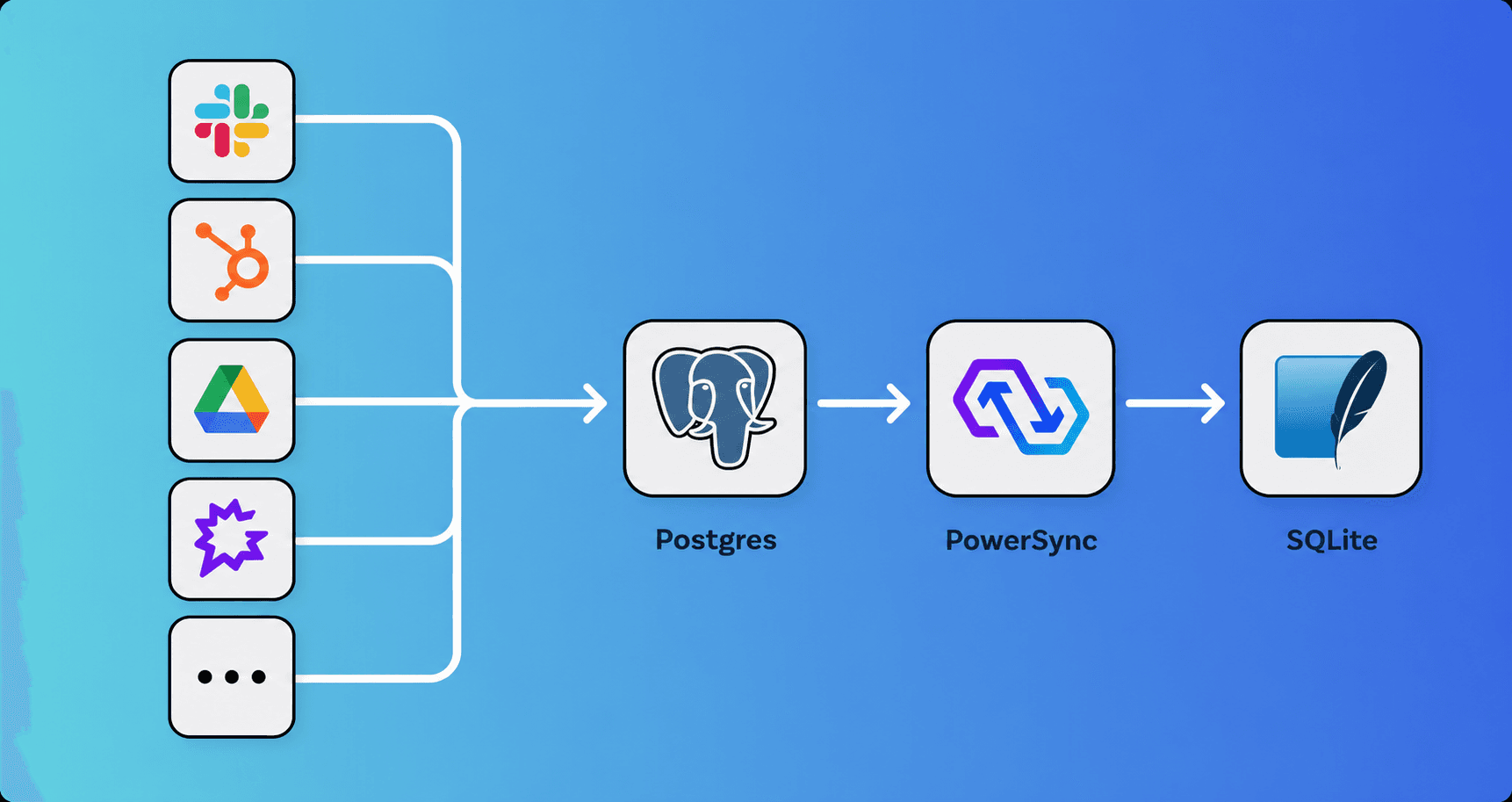
We built a set of simple Node.js-based ingesters that mostly use APIs & Webhooks to aggregate data from 14 (and counting) different systems like Google Drive, GitHub, Zendesk, Gong, HubSpot, Slack, etc. into a single Postgres database. The shape of the data is optimized for agent usability, using Markdown for free text, and rolling up data into columns in a single row containing JSON or Markdown where it makes sense. Then we used PowerSync to sync Postgres with a SQLite database, in which we create a full-text search (FTS) index. We dynamically generate a skill that gives any agent useful information about the schema and SQLite query conventions (including using the sqlite3 CLI which ships with macOS and is readily available on Linux and Windows).
Then we created two tools for the team that can be used based on preference:
- A Slack bot that has a real-time synced SQLite database (using the PowerSync Node.js SDK), and uses Claude in headless mode with our provided skill to answer prompts when tagged in public Slack channels1; and
- A CLI tool that provides a synced SQLite database and our skill, so that you can use the company brain on your own machine with the agent of your choice. Since it's just SQLite, you can use it offline with local models.
TL;DR: The Results
This relatively simple architecture resulted in an incredibly useful tool. It turns out that the latest models and harnesses are really good at figuring out how to use a SQLite database. This includes running queries (including aggregations) over embedded JSON in the database – SQLite has really good built-in support for JSON.
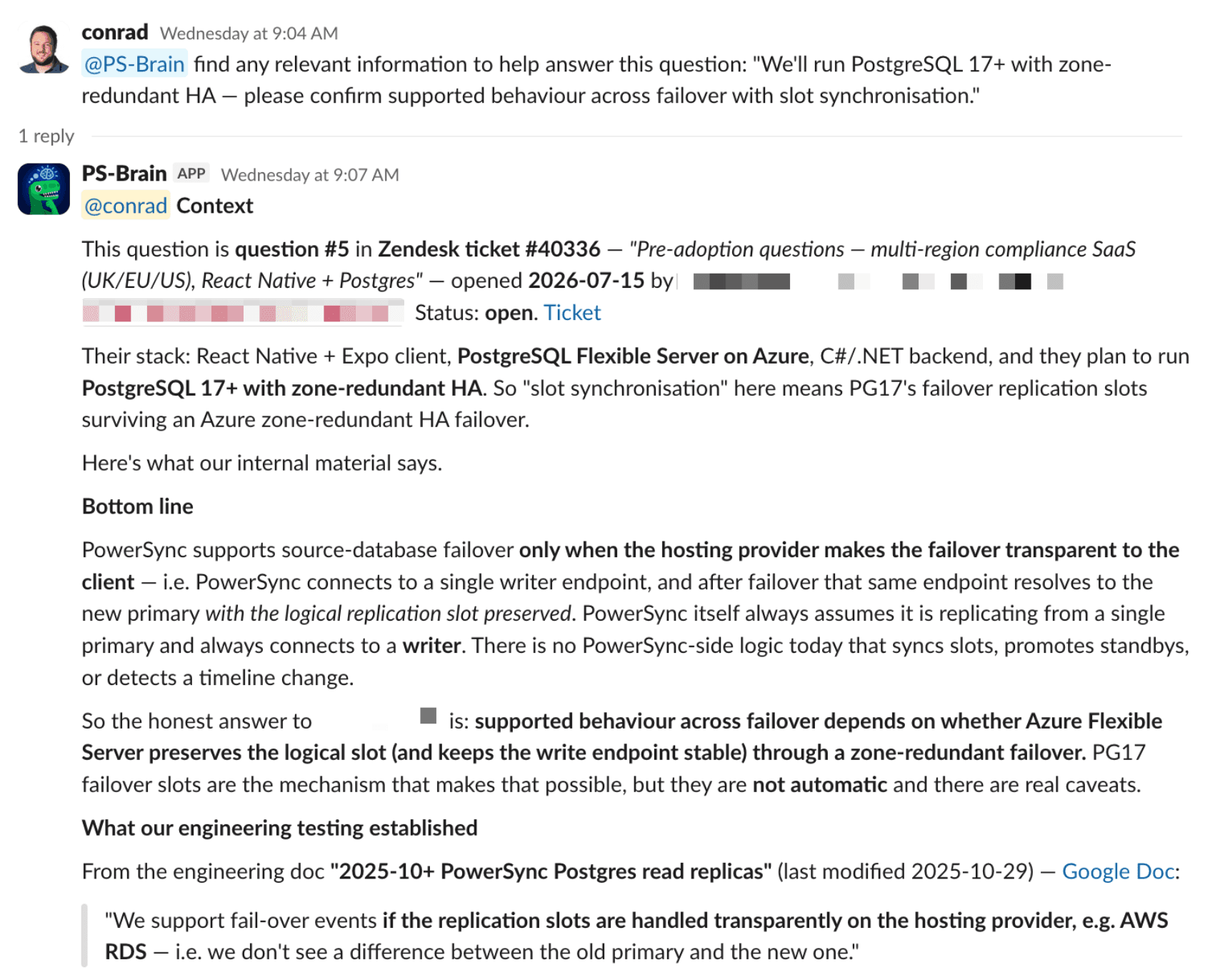
Our team quickly adopted the tool and it has saved us a huge amount of time on doing any kind of work that benefits from stitching together context across siloed systems. Our experience was very similar to what the YCombinator team spoke about when they built something similar with Postgres:
It didn't just make it easier to answer questions, it dramatically increased the number of questions that we would ask and dramatically increased the scale and complexity of the questions that we would dare to ask.
If you're interested in a deeper dive of how we put it together, read on.
Data Ingesters
Here's a few examples of our ingesters to give you an idea of how we structure the data:
- Slack: We have one Slack bot that doubles as both a data ingester and a prompt-answerer. It uses Slack's Socket Mode to ingest data in real-time in any channels it's added to, and to listen for prompts. In Postgres, we store one row per channel per day. Whenever there's an event in that channel, we update the existing roll-up for that day. The whole channel conversation is rendered in Markdown format, including the contents of threads. We convert attachments like PDFs and images to Markdown using an LLM API.
- Google Drive: For simplicity, we currently poll the Drive Changes API. We have a table with a column for the Markdown representation of each Drive file. Google Docs are easy to export as Markdown. We use the Sheets API to build nice Markdown tables of spreadsheets, which frontier LLMs do an excellent job of interpreting. PDFs get converted to Markdown too using an LLM API. For DOC/DOCX files, we use Mammoth to convert to HTML, and then convert that to Markdown. We also render all the comments on Drive files as Markdown, including their highlighted text.
- HubSpot: We ingest all the Companies in our HubSpot system (which represent our customers), and embed the contacts for each company as a JSON column on the company row. The HubSpot company IDs are an identifier shared across several of our systems, which makes it easier for agents to associate data across different systems.
- Gong: We ingest the transcripts of calls, and also use an LLM API to generate meeting notes in Markdown format.
- Stripe: We ingest customers from Stripe, and build JSON embedded representations of each customer's subscriptions and invoicing history. These are simply stored as columns on the customer rows.
- GitHub: We ingest Issues, PRs and Discussions – including their descriptions and comments.
- Product Analytics: We already had a homebrewed product analytics system that stores its data in a Postgres database. When ingesting that data, we transform it into a single row per customer organization, containing a few JSON columns that aggregate useful high-level analytics.
- Gmail: We ingest customer email threads, by comparing the domain names of the email participants with HubSpot Customers. Email conversations are rendered as Gmail-style threads, with quoted text and non-customer-facing messages stripped. PDF and image attachments are converted to Markdown using an LLM API.
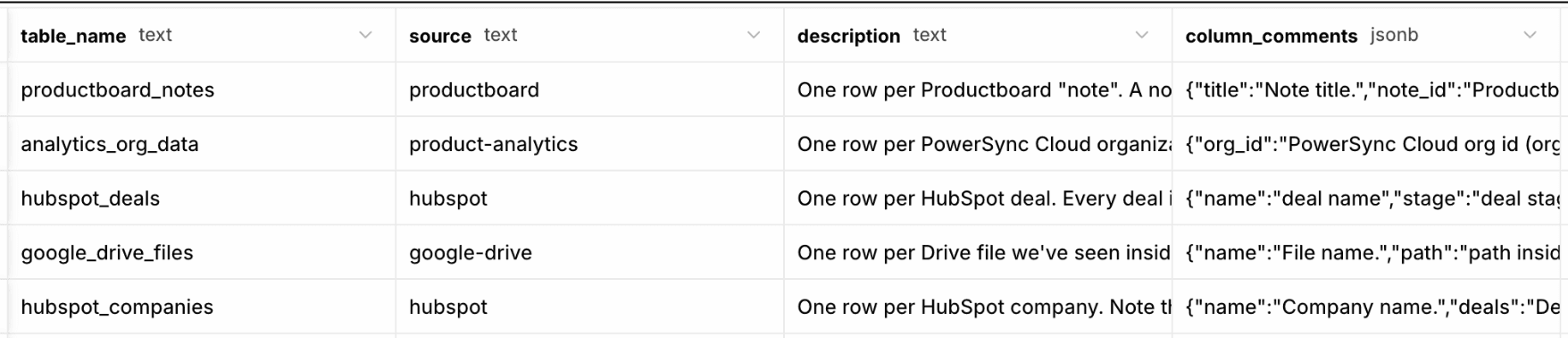
There is a "meta" table in Postgres which contains descriptive information about the schema. Each ingester's schema.sql definition file is responsible for doing an upsert into that table with its metadata. These help the agent with interpreting the database and knowing where to find what information (more on that below).
Syncing to SQLite
For syncing from Postgres to SQLite, we define auto-subscribing Sync Streams in PowerSync for the relevant tables. We currently have a single company-wide dataset, but we could also use partial syncing for gating access to specific data. This would also allow scaling to a much larger total dataset – with users only syncing the part of the data that is relevant to them.
 stripe_customers:
    auto_subscribe: true
    queries:
      - SELECT id, stripe_id, email, name, description, currency, balance, delinquent,
               created_at, subscriptions, invoices
          FROM stripe_customers
          WHERE archived = false
At our scale we currently have on the order of ~100k records being synced to SQLite, which takes about ~20 seconds for the initial sync, and then PowerSync keeps the SQLite database updated incrementally with deltas after that.
Skill
We dynamically generate a skill (based on a template) containing information to help the agent with using the SQLite database:
- A schema description using the contents of the "meta" table mentioned above.
- Usage and input/output guidelines for the
sqlite3CLI - Guidelines on SQLite types, working with JSON, and using full-text search (FTS)
- Suggested workflow for answering a question
- Basic heuristics to decide what information is authoritative
- Matching related data about an organization or person across tables (prefer shared identifiers where available, or use company domain name or email address, or fall back to proper noun matching)
- Confidentiality note ("Do not transmit data outside the user's local environment without explicit permission")
It might actually be sufficient to have a static skill with instructions on retrieving the schema description from the "meta" table, to avoid the step of dynamically generating the skill. We haven't tested that yet.
Slack Bot
The prompt-answering/Q&A part of the Slack bot is pretty straightforward. It listens for mentions of its name on any channels that it's a member of, and then launches claude in headless mode to execute prompts using the skill and SQLite database (which is synced in real-time using the PowerSync Node.js client SDK). If a schema change is detected, it currently resyncs the SQLite database (since this is a reasonably inexpensive operation).
For security reasons, we block the Slack bot from answering questions in any Slack Connect channel, or any channel with outside guests. We also limit the tool calls that Claude can execute (sqlite3), disable web search/fetch, provide minimal allowlisted env vars, and limit the outbound network access of the machine where the bot runs.
CLI Tool
When the CLI tool is first launched, it opens an internal web app where the user has to sign in with their Google Workspace account (our main identity provider). That passes a longer-lived JWT back to the CLI. The CLI uses that longer-lived JWT with the internal web app's API to securely mint short-lived JWTs (valid for only 5 minutes) for PowerSync's authentication which allows syncing the SQLite database. If the longer-lived JWT expires or its associated session is revoked, the CLI wipes the SQLite database for security. Whenever the CLI is running, it keeps the SQLite database in sync in near real-time (we will probably turn this into a background daemon in the future).
Any decent agent can use the SQLite database and skill provided by the CLI.
It Works Offline, Running Locally On-Device
Since we are giving the agent all the context it needs in a SQLite file, we can use the company brain offline with local models. We have used it with Ollama paired with either Pi or Claude Code.
With models like Gemma4 26B that we've been using so far, the quality of company brain answers are obviously not on par with frontier models like Opus, Fable and GPT5, but are still respectable and provide a solid fallback if we happen to not have Internet access at any point2.
When the user goes back online, PowerSync will sync the deltas to bring the SQLite database up to date.
This project serves as a reference implementation for how PowerSync can be used to provide a locally-available synced context layer (in SQLite) for "edge AI" / on-device AI use cases with local open-weight models. This was not specifically one of the original requirements for our 'company brain', but it turned out to be a useful benefit of the PowerSync-SQLite architecture.
Roadmap
This is phase 1. There's a lot of things we want to explore further.
The first one will likely be bi-directional syncing. We can allow agents to codify knowledge in the database (e.g. customer intel, market knowledge, etc.). PowerSync allows us to control how SQLite mutations are processed into Postgres with server-authoritative logic in our backend application.
Another one is keeping fresh copies of all our product Git repos as references that can be consulted when answering questions and performing work. This would give us even richer context and more precision. Agents will be able to combine data from all our systems with the product source code as ground truth.
We have several other ideas that are percolating.
Want to Use This?
If you would like to run your own version of this and would like to use our implementation as a baseline, we will open-source it. Let me know if you're interested.
Postgres Alternative?
Instead of syncing the data from Postgres to SQLite, another possibility we superficially investigated is to define a skill that instructs the agent to query Postgres directly, using psql. We briefly tested this but didn't explore it deeply. With the PowerSync-SQLite approach, access control can be achieved by partially syncing the Postgres data to users based on their permissions, whereas for Postgres, Row-Level Security (RLS) may be suitable for access control. When using Postgres, the 'company brain' would also not be usable offline, and as mentioned above, an on-device AI reference implementation was one of the benefits we achieved with this project. However, using Postgres directly may be suitable for the needs of other companies.
Footnotes
-
The experience is similar to Claude Tag, which was launched by Anthropic a few weeks after we launched our internal company brain Slack bot. ↩
-
Another idea we want to investigate is using something like LiteLLM AI Gateway to route prompts to cloud or local models based on their complexity. ↩